Coche: your Tesla's data in Frunk.tv, step by step
Coche shows you how your Tesla is doing right now, every trip, every charge and where you have driven, on your phone, your computer and the car's screen, and tells you on Telegram when it has finished charging or has been left open. It connects in about five minutes with your Tesla account, with nothing to install and without giving us your password. It is exclusive to Premium, and the connection to Tesla costs 350 Telegram Stars every 30 days per car.
Everything it includes
| Right now | Battery percentage, range and charge limit; whether it is parked, driving or charging; whether it is locked; the temperature inside and outside; the total kilometres, and when its last signal arrived. See |
|---|---|
| Trips | Every trip of the last 30 days, day by day: time, distance, duration, energy, consumption and top speed, with the totals for the period. See |
| Charges | Every charge: how much it added, how long it took, from what percentage to what, at what peak power and whether it was at home or at a Supercharger. See |
| Drives on the map | Where you went on each trip, encrypted with a key that only your screens have: not even Frunk.tv can see it. Only if you want it: it comes turned off. See |
| Telegram alerts | Charge finished or interrupted, a door or the trunk left open, the car unlocked, Sentry on alert or alarm, and a software update available. They are turned off with one checkbox. See |
| On the car's screen | The Coche card on Frunk.tv's Home in the Tesla, with its status, its trips, its charges and its drives. See |
| On your phone and your computer | At frunk.tv/cuenta/coche and, if you have signed in to your account, the Coche card on frunk.tv's Home. See |
| Carretera with your real battery | When planning a route, your Tesla's battery and your real motorway consumption, instead of those of an example car. See |
Frunk.tv only reads: it doesn't unlock, start, turn on the climate or wake up the car. It doesn't see your Tesla password either, which you type on Tesla's page.
Price
| What it is | How much | |
|---|---|---|
| Premium | You need to have it. It includes what is Frunk.tv's own in Coche: its screens, the drive map, the alerts and your car in Carretera, as well as everything else in Premium (what's included) | 600 Stars, a one-time payment |
| Connection to Tesla | What it costs for Tesla to send your car's data, and to keep it going | 350 Stars every 30 days, per car |
- The connection is a subscription: you pay in the Telegram bot and it renews by itself every 30 days. The bot lets you know 15 days before each renewal.
- You cancel whenever you like with
/coche canceland it lasts until the end of what you paid for;/coche resumeputs it back on. In the 14 days after paying,/coche withdrawgets you a full refund. - If you already have Premium, including one bought by October 31, 2026, the connection is paid for all the same: it isn't a Frunk.tv service of its own but Tesla's, which charges for every car and every month.
Before you start
- Frunk.tv Premium on your Telegram (how to buy it), and Stars, which you buy in Telegram's Settings.
- Your Tesla account, the car owner's, and the Tesla app on your phone.
- Be next to the car for the key step, with your phone's Bluetooth turned on.
- Do it in the regular browser on your phone or computer (Chrome, Safari…), not inside Telegram or on the car's screen: Tesla sends you back to the browser where you started.
1. Subscribe
- Open frunk.tv/cuenta and sign in with your Telegram. Then go to
frunk.tv/cuenta/coche: you will see what it includes and the price.
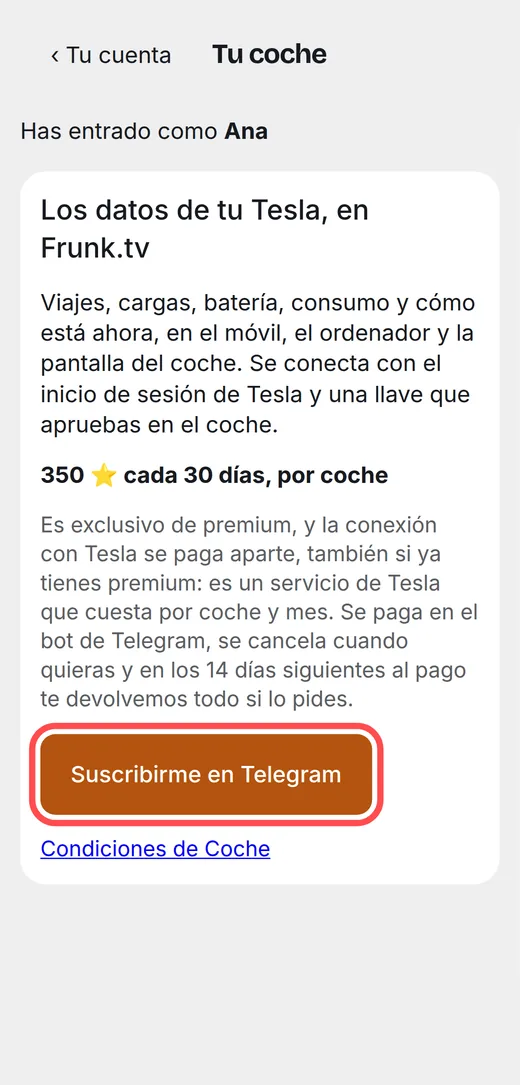
With Premium, the Subscribe in Telegram button. 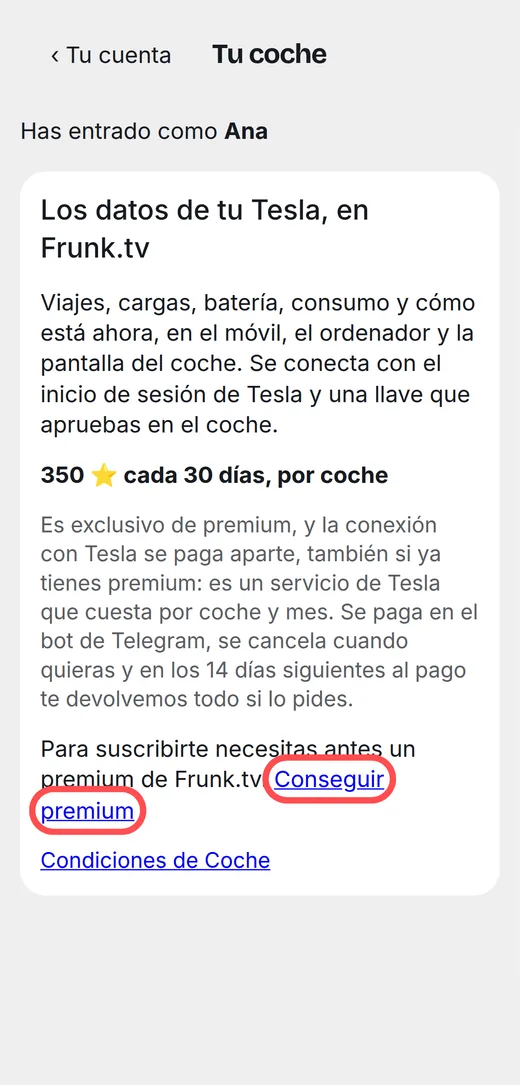
Without Premium, Get premium first. - Tap Subscribe in Telegram, or type
/cocheto the bot @frunktv_bot. In Telegram, tap Subscribe for 350 ⭐ and pay with Stars.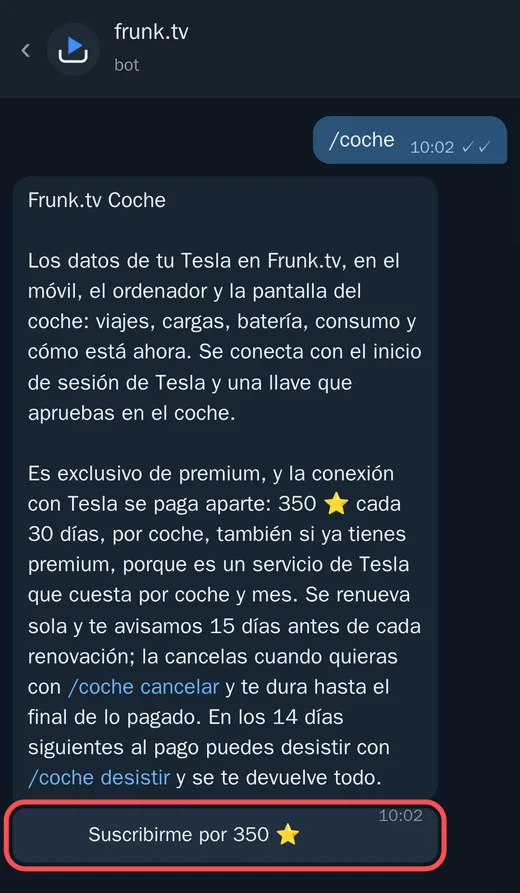
The bot explains the price and how to cancel before charging anything. 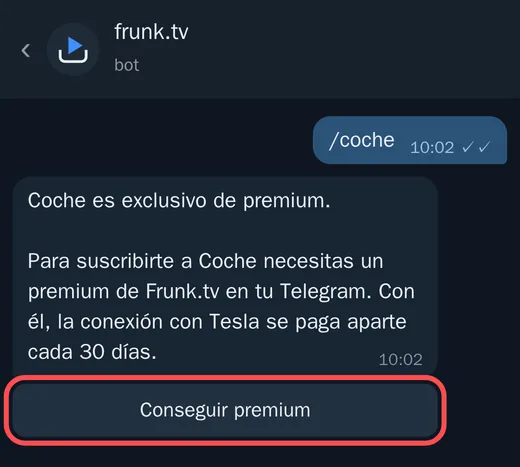
Without Premium, the bot takes you to get it first. - The bot thanks you with a button, Connect my Tesla, which takes you back to the page.
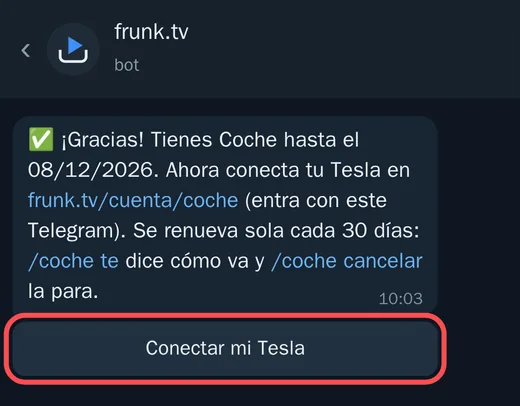
Open it in the browser, not inside Telegram.
2. Connect your Tesla account
- At frunk.tv/cuenta/coche, tap Connect with Tesla.
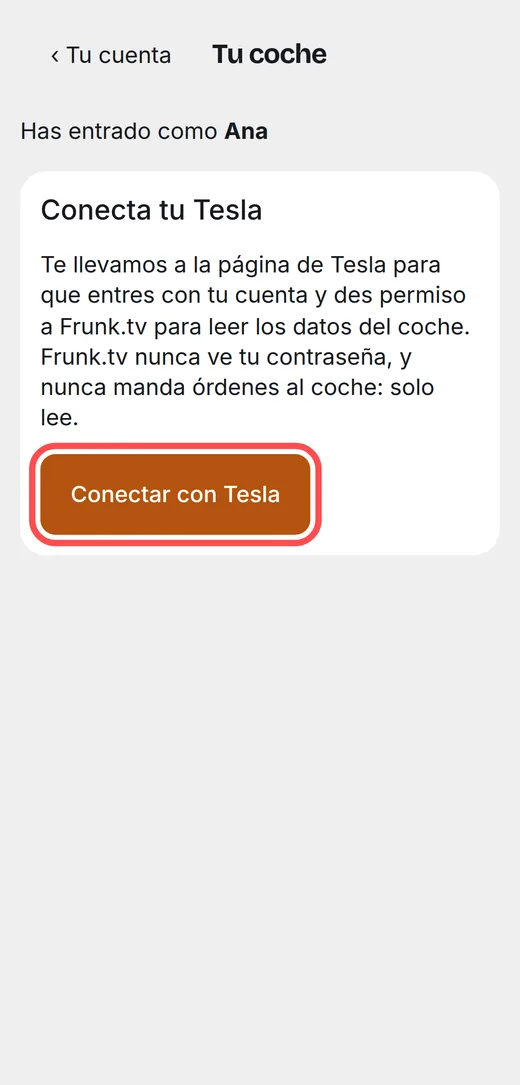
Frunk.tv never sees your password: you type it on Tesla's page. - On Tesla's page (auth.tesla.com), sign in with your account and accept the permissions Frunk.tv asks for: the vehicle data and its location. The location is only stored if you turn on the drives, and then encrypted; otherwise it is discarded.
- Tesla sends you back to Frunk.tv, which says “Tesla connected”.
3. Pick the car
The cars on your Tesla account appear. Tap This one on the one you want to see. Each subscription is for one car.
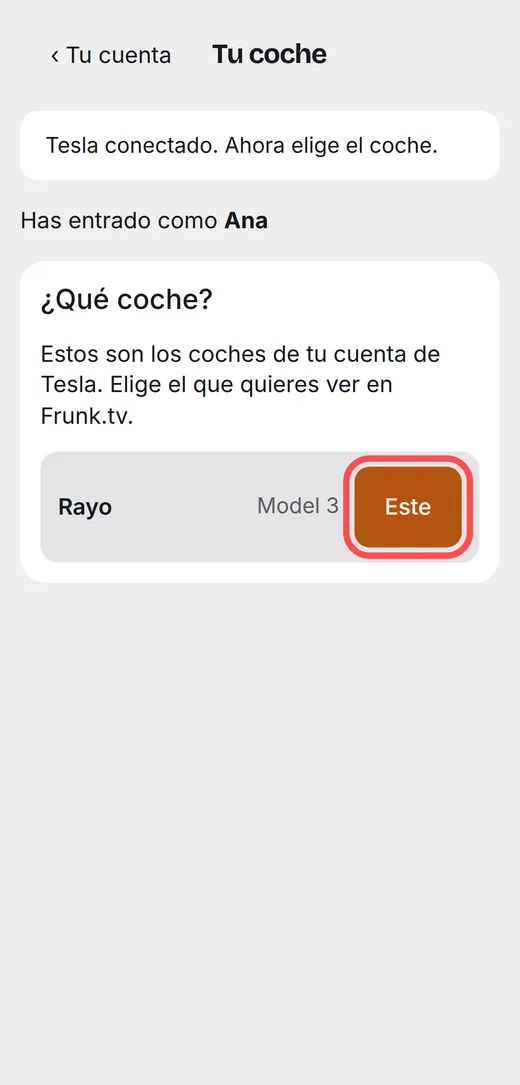
4. Approve the key in the car
Tesla asks the owner to approve Frunk.tv's key in the car. It is a key only for reading data: it doesn't unlock or start anything.
- Next to the car, on your phone, tap Approve in the car. The Tesla app
opens.
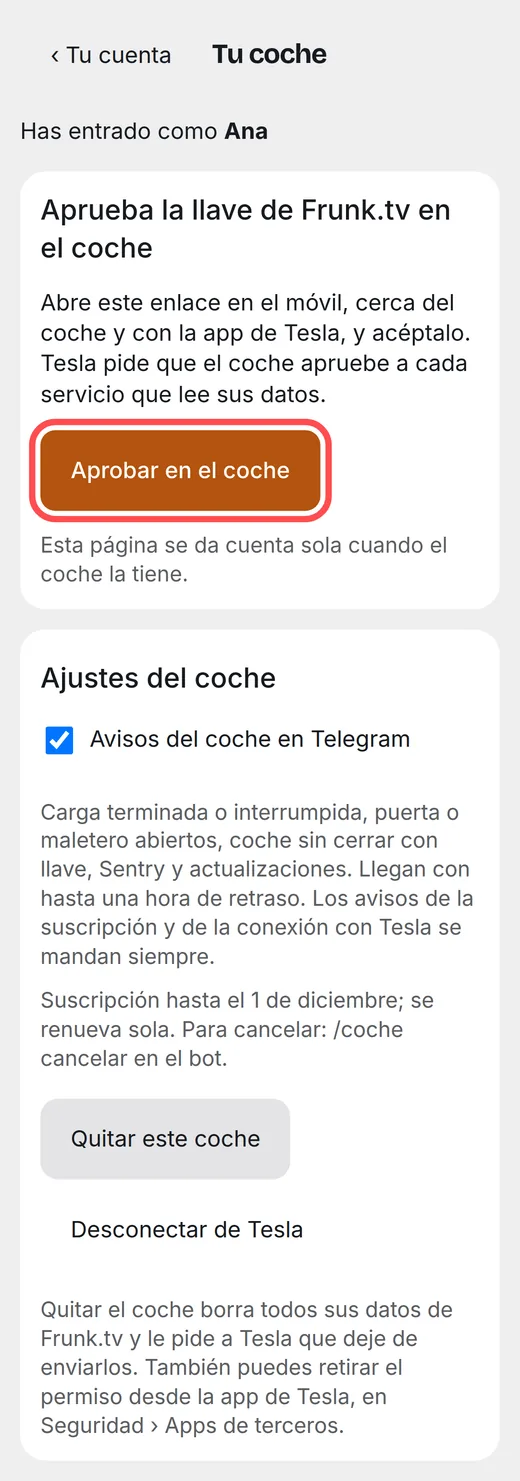
From the phone, one tap. - On a computer? Scan the code with your phone's camera.
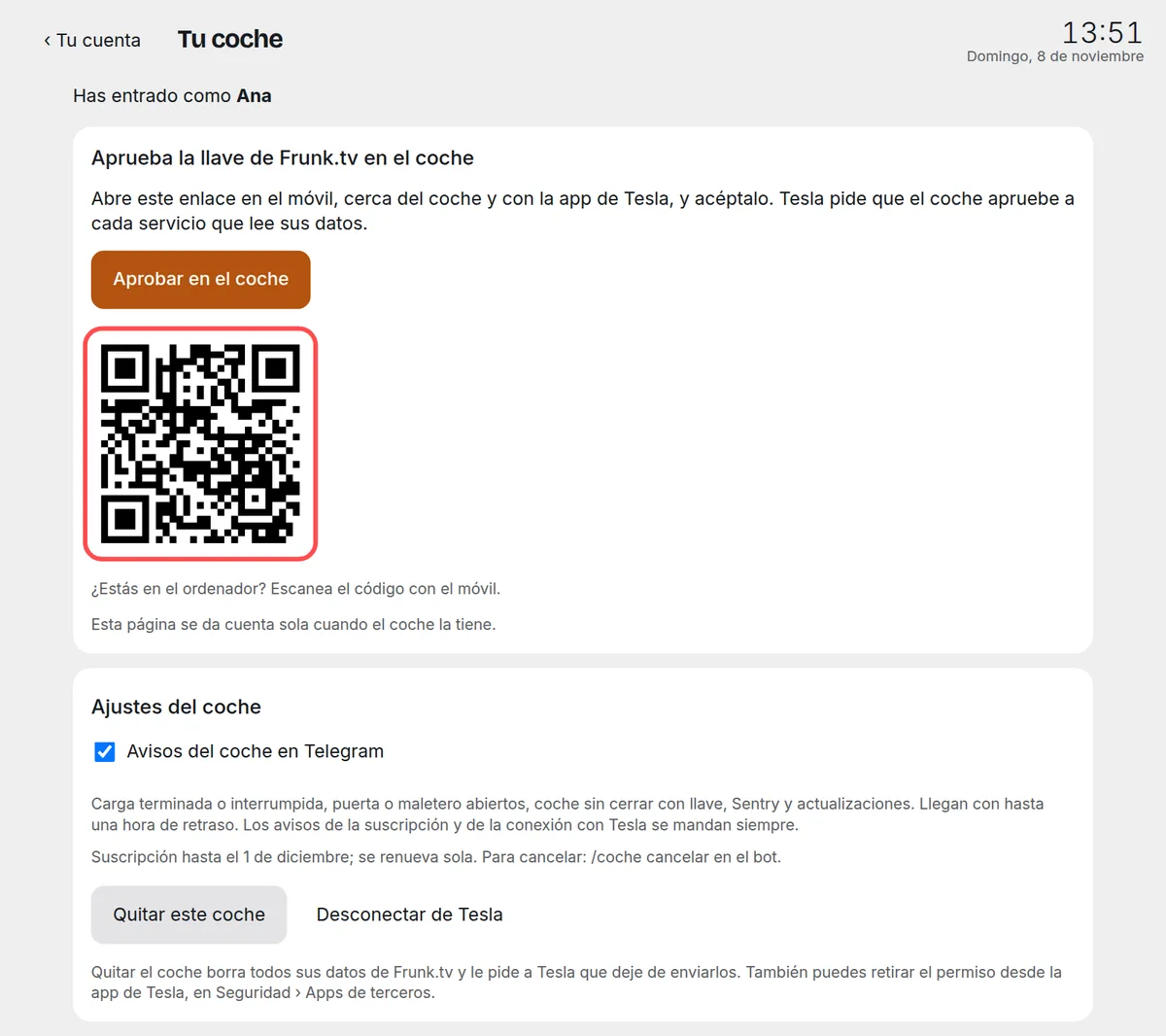
The code leads to the same Tesla page. - In the Tesla app, accept adding Frunk.tv's key. If it asks, hold the key card against the car's reader (behind the screen, on the center console).
- You don't need to touch anything else: the page notices by itself within a minute at most and moves on to
waiting for the first data.
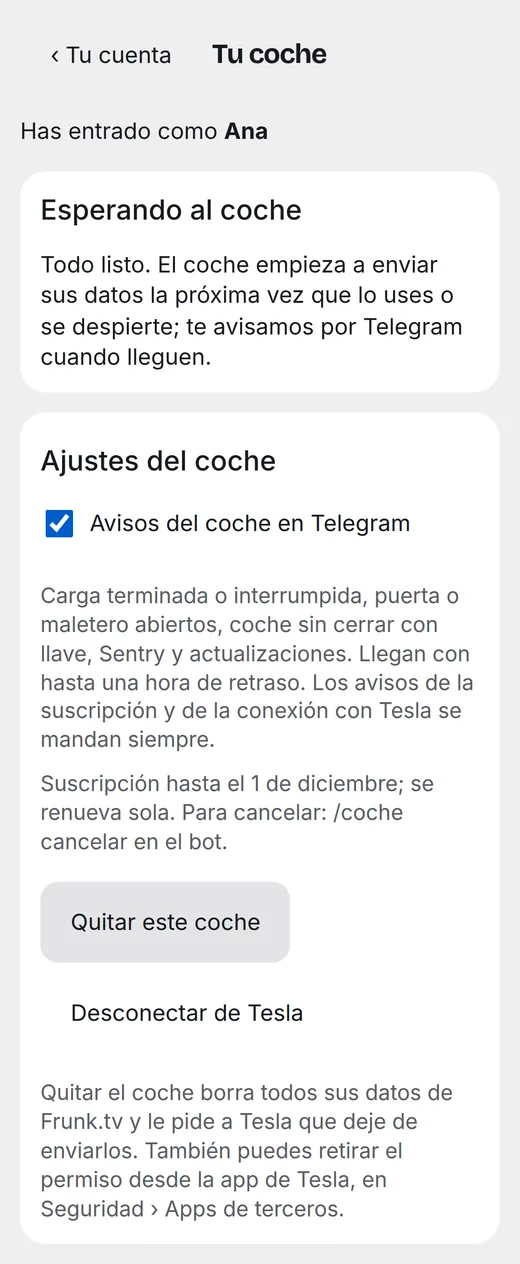
The first data arrives when the car wakes up: when you open it or drive. - When it arrives, the bot tells you.
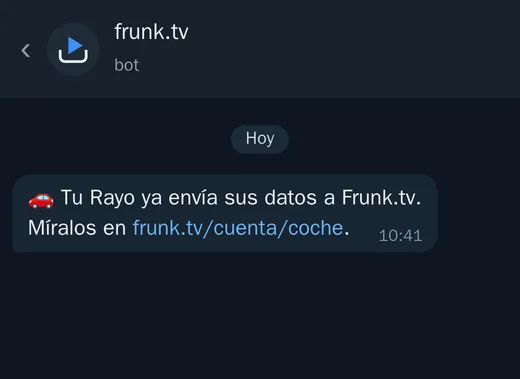
From here on, everything happens by itself.
5. Your car right now
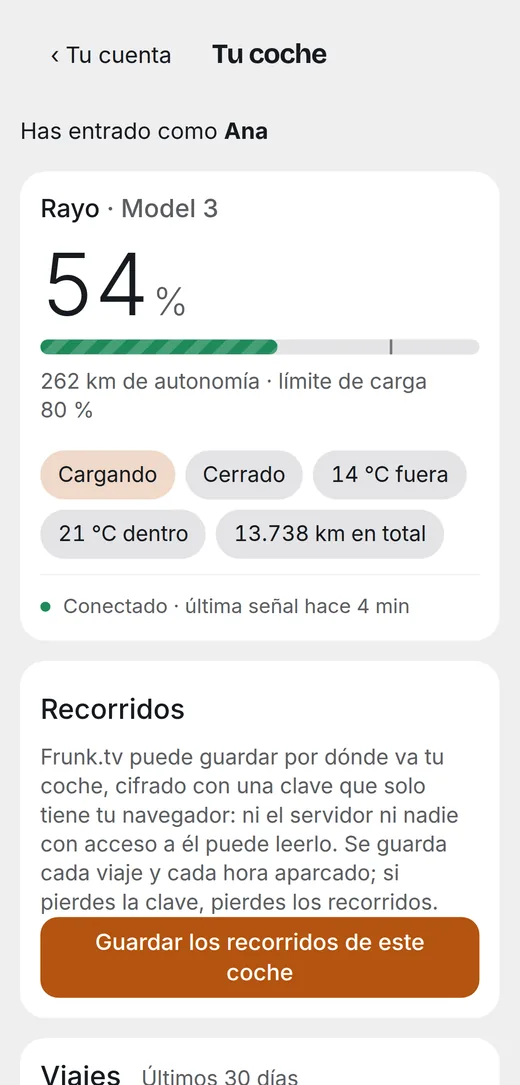
At the top of frunk.tv/cuenta/coche: the battery with its bar and the charge limit mark, the range, and some tags with its status (parked, driving or charging; closed or open; the temperature outside and inside; the kilometres). Below, whether it is connected or asleep and when its last signal arrived.
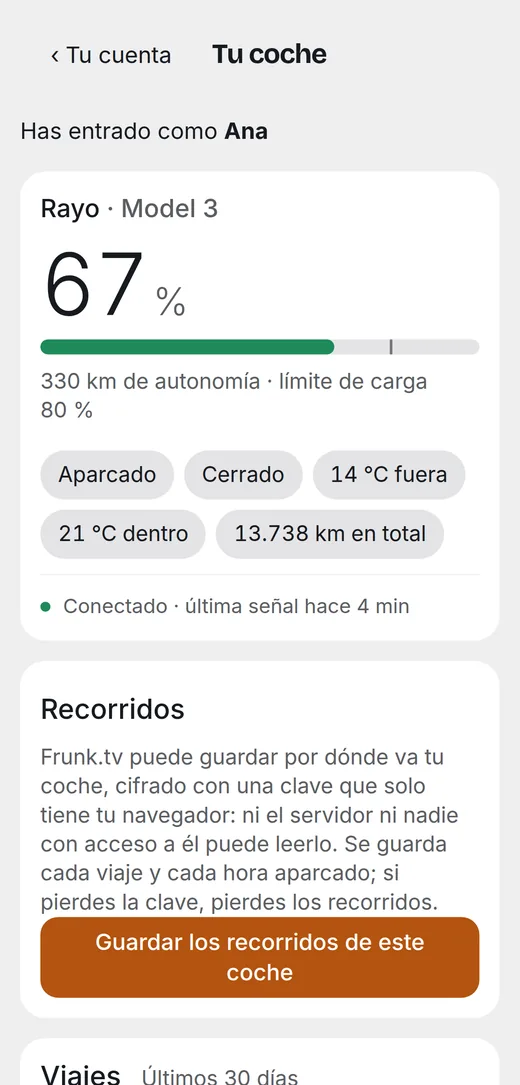
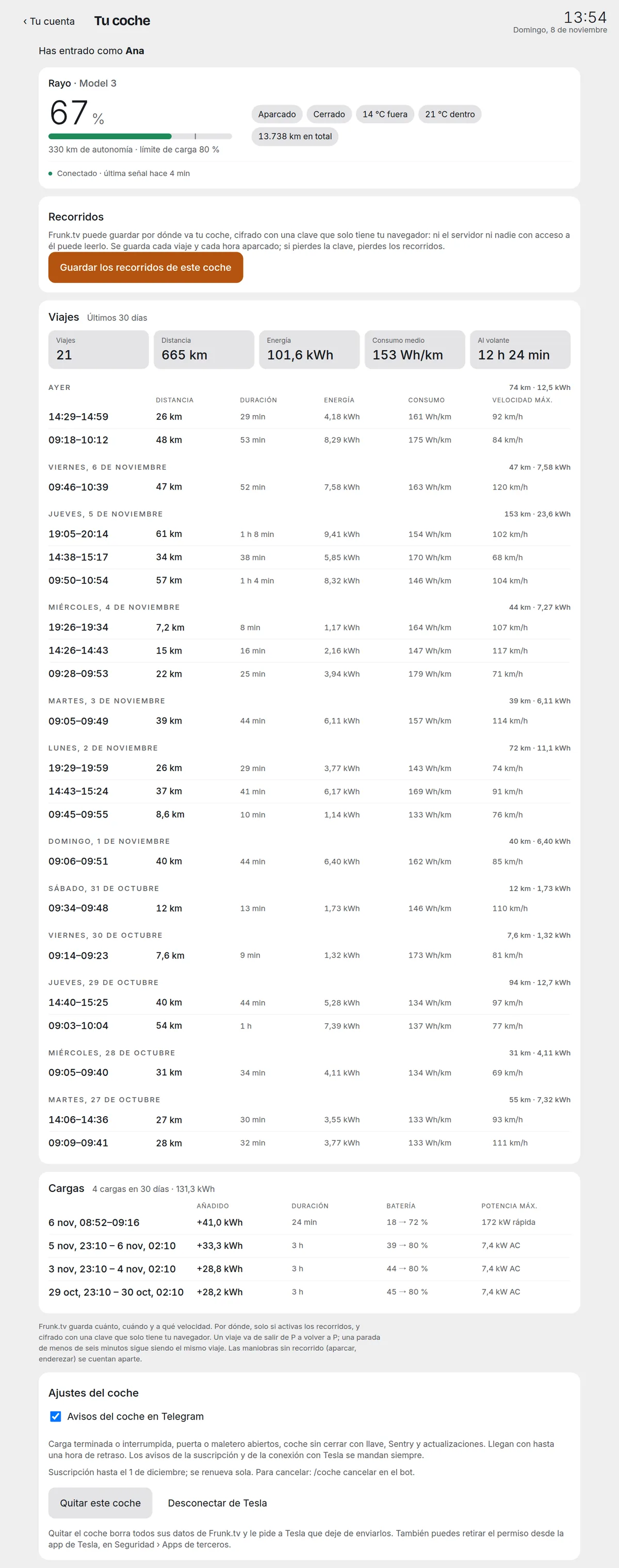
On the computer, everything on one page: the status, the drives, the trips, the charges and the settings.
6. Trips
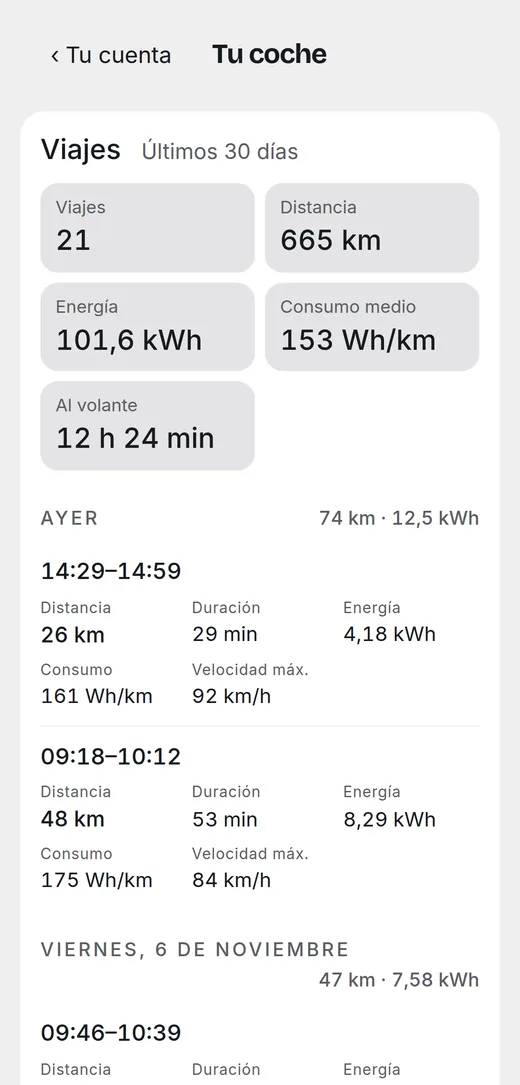
Those of the last 30 days, grouped by day: departure time, distance, duration, energy used, consumption and top speed. At the top, the totals for the period: trips, kilometres, average consumption and time behind the wheel.
7. Charges
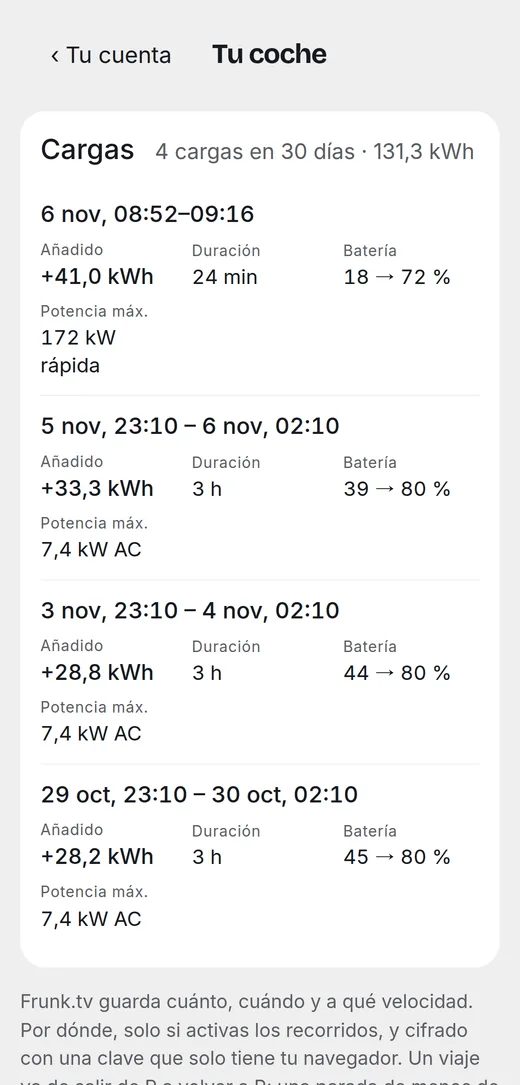
Every charge: when, how long, from what percentage to what, the kWh that went in and the peak power, and whether it was at home (alternating current) or fast, at a Supercharger or another charger.
When is it cheapest to charge at home? Check it in Electricity price.
8. Drives on the map
Where you went on each trip, on the map. It comes turned off: until you turn it on, Frunk.tv discards the car's position without storing it.
- At frunk.tv/cuenta/coche, tap Save this car's drives. Your browser
creates a key; only its public half reaches the server, which uses it to encrypt each trip.
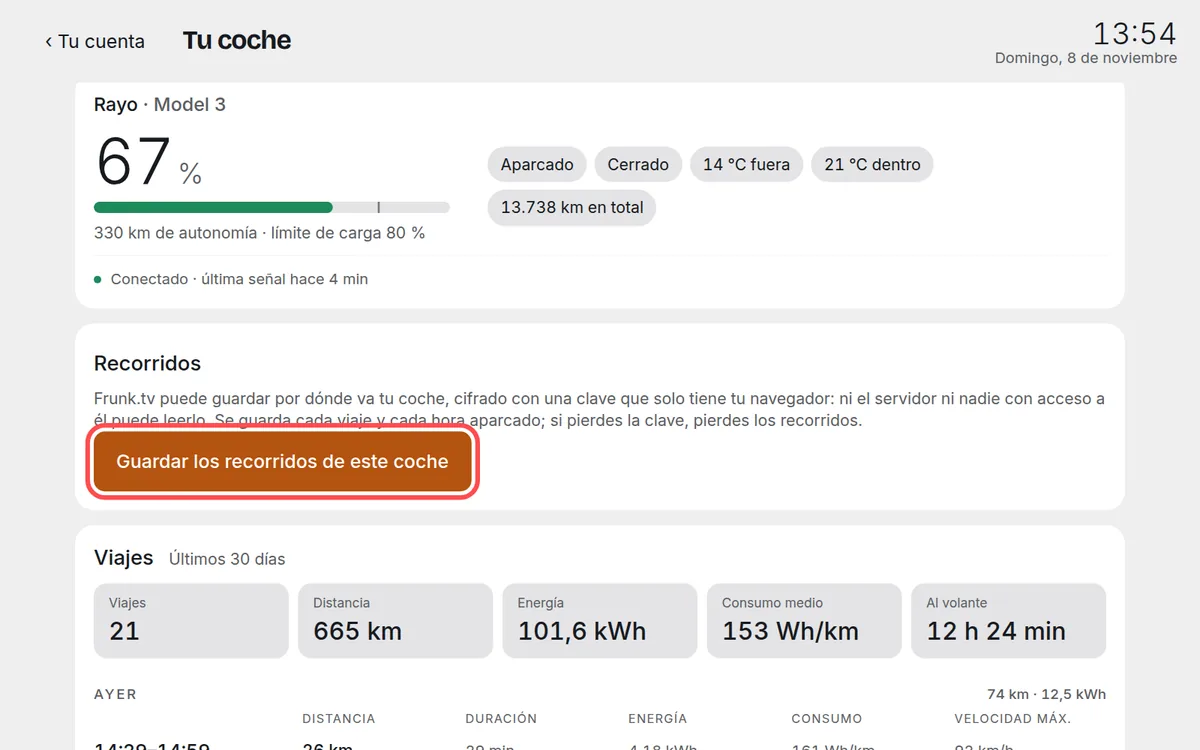
It is turned on once per car. - From then on, each trip is stored encrypted. Tap a trip to see it on the map: the green dot is the start and
the red one, the arrival.
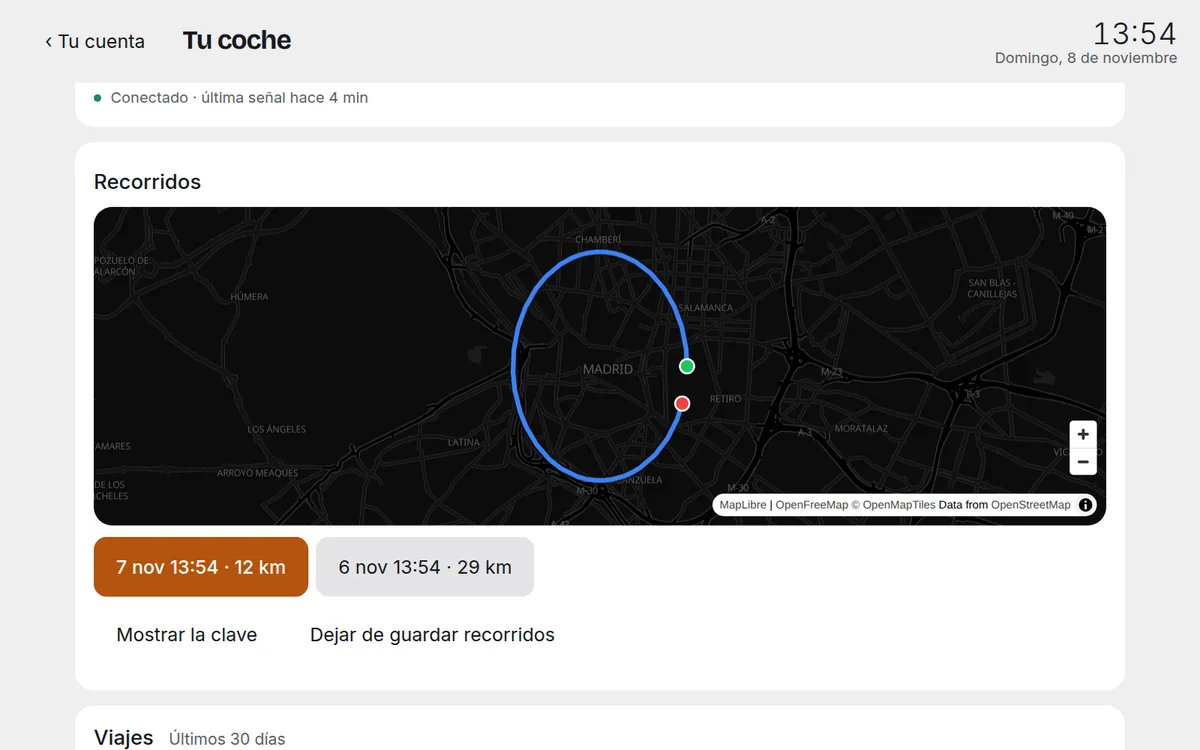
The last 30 days; they are kept for a year. - Keep the key: with Show the key you see it so you can copy it into a
password manager. Without it, the drives cannot be recovered: nobody else has it, not even Frunk.tv.
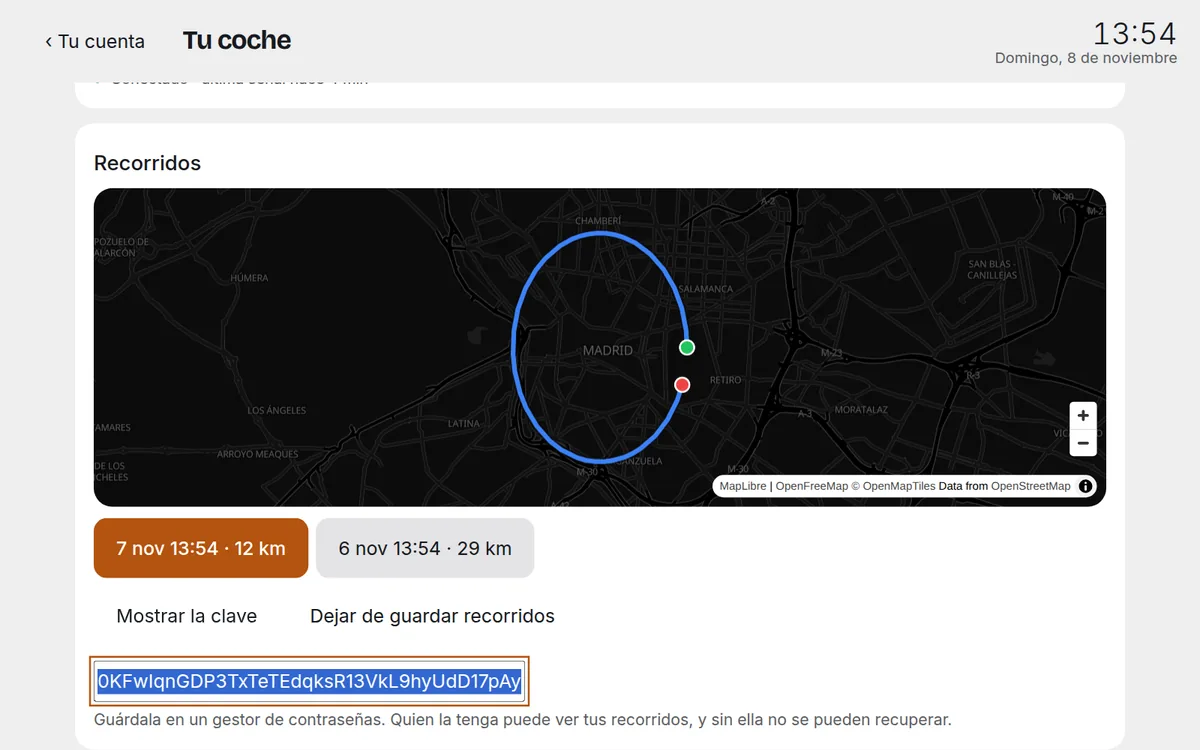
Whoever has the key can see your drives: keep it like a password.
- On your other screens: if you have your Premium synced in that browser, the key travels by itself, end-to-end encrypted, to the car's screen and to your devices with that Premium. If not, each screen asks for it once: paste it and tap Use this key.
- Stop saving drives instantly deletes everything stored. Start again with another key, if you lose yours, does too.
9. Telegram alerts
The bot writes to you when something happens with the car, only once per event:
| Alert | When it arrives |
|---|---|
| 🔋 Charge finished | When a charge ends, with the percentage it reached. |
| ⚠️ Charge interrupted | If the charger loses power in the middle of a charge. |
| 🚪 Door or trunk open | Parked with a door or the trunk open for more than 15 minutes. |
| 🔓 Not locked | Parked unlocked for more than 30 minutes, with the climate off (in case someone is inside). At most two alerts per week. |
| 👁️ Sentry on alert · 🚨 on alarm | If the car reports that Sentry Mode has moved to alert or to alarm. Frunk.tv receives no images and doesn't know what triggered it. |
| ⬆️ Update available | When the car has a new software version waiting, once per version. |
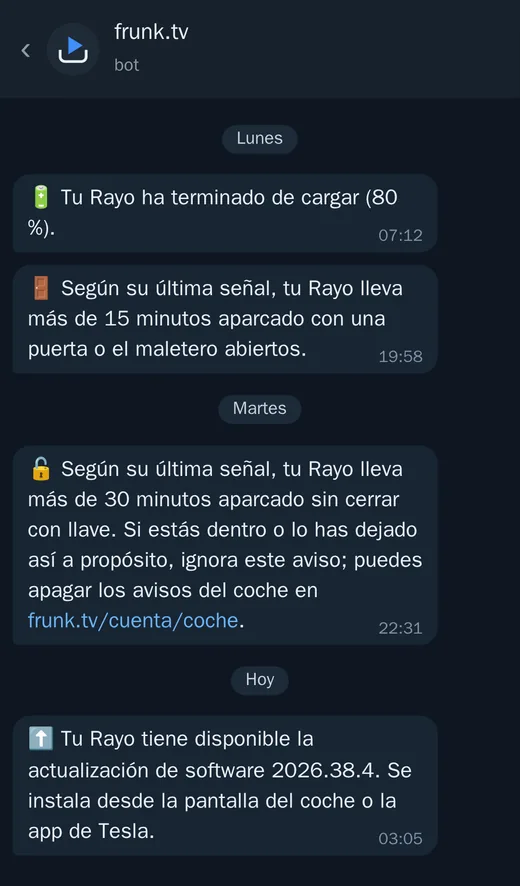
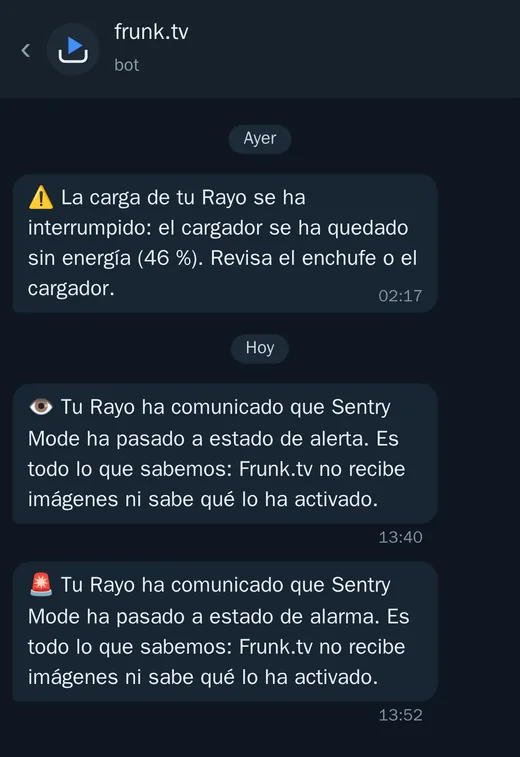
- They arrive up to an hour late: Frunk.tv checks the car once an hour. They are not an alarm: for anything urgent there is the Tesla app.
- Turning them off: in the settings at frunk.tv/cuenta/coche, untick Car alerts in
Telegram. When you turn them back on, you don't get a flood of what happened while they were off.
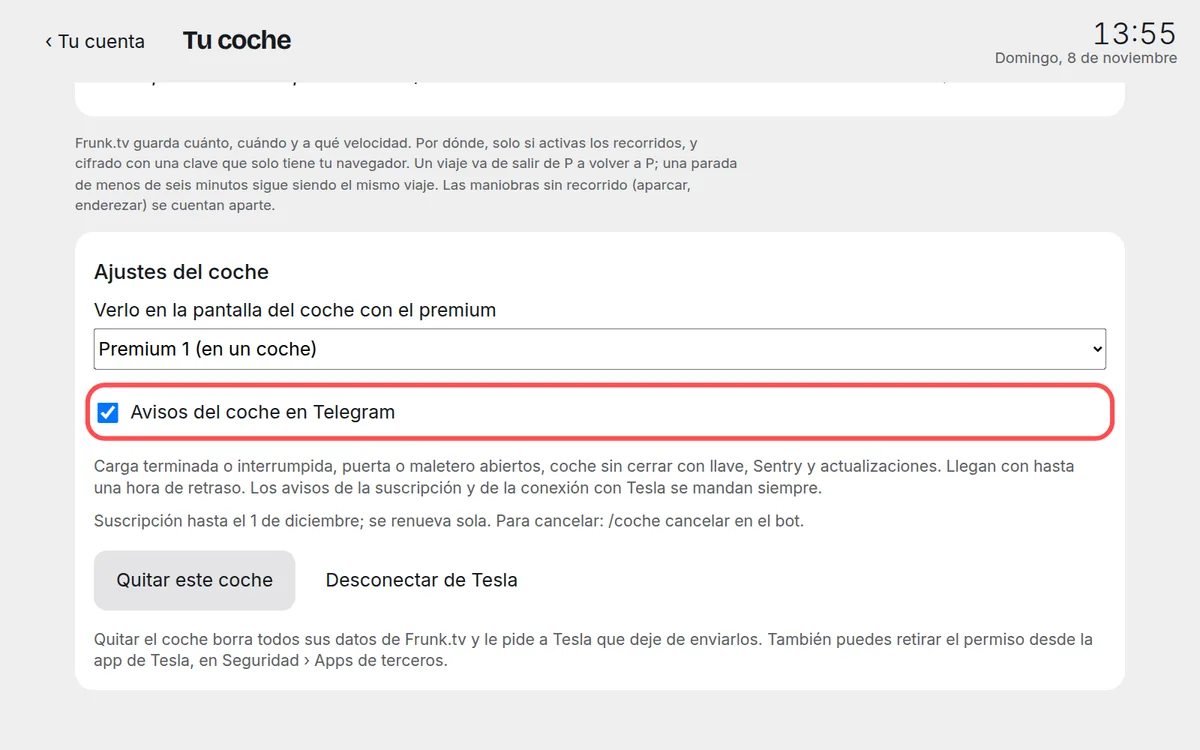
One checkbox for all the car's alerts. - The alerts about the subscription and the connection to Tesla (below) always arrive: without them you wouldn't know the car has stopped sending data.
10. On the car's screen
- In the settings at frunk.tv/cuenta/coche, under See it on the screen of the car with the
premium, pick the Premium you have activated in that car.
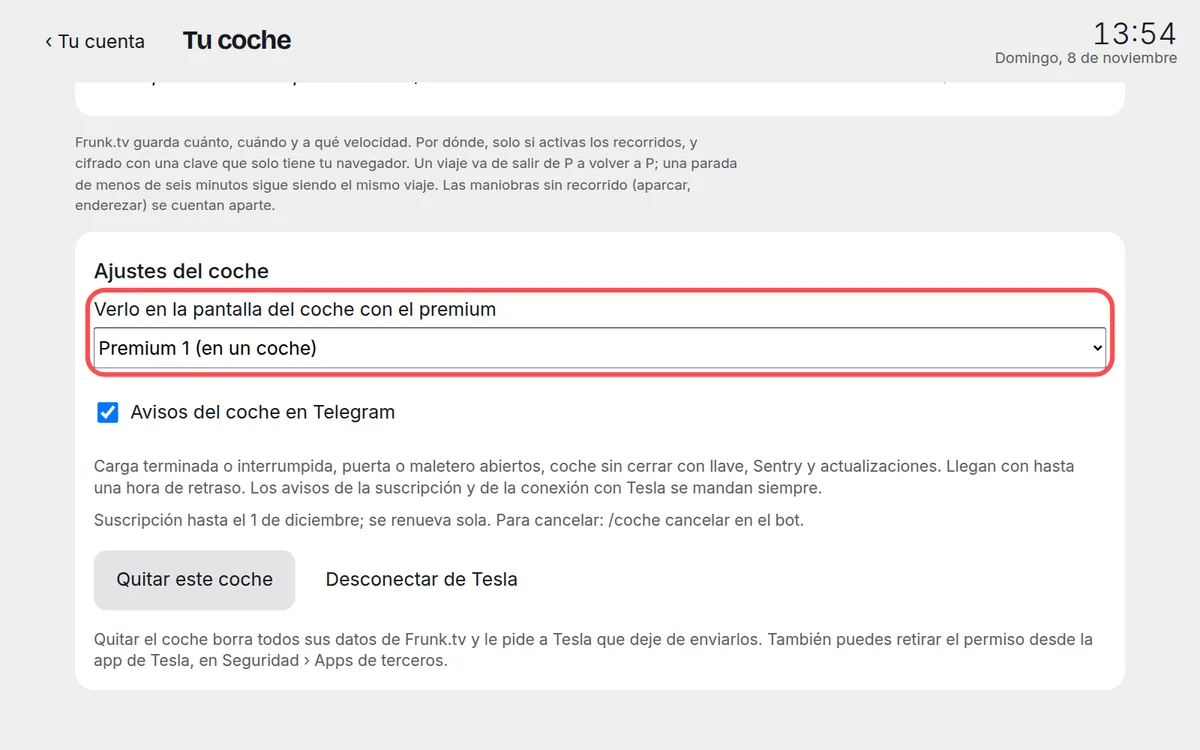
If you have several Premiums, the car's says “(in a car)”. - In the Tesla's browser, at frunk.tv, the Coche card appears on
Home.
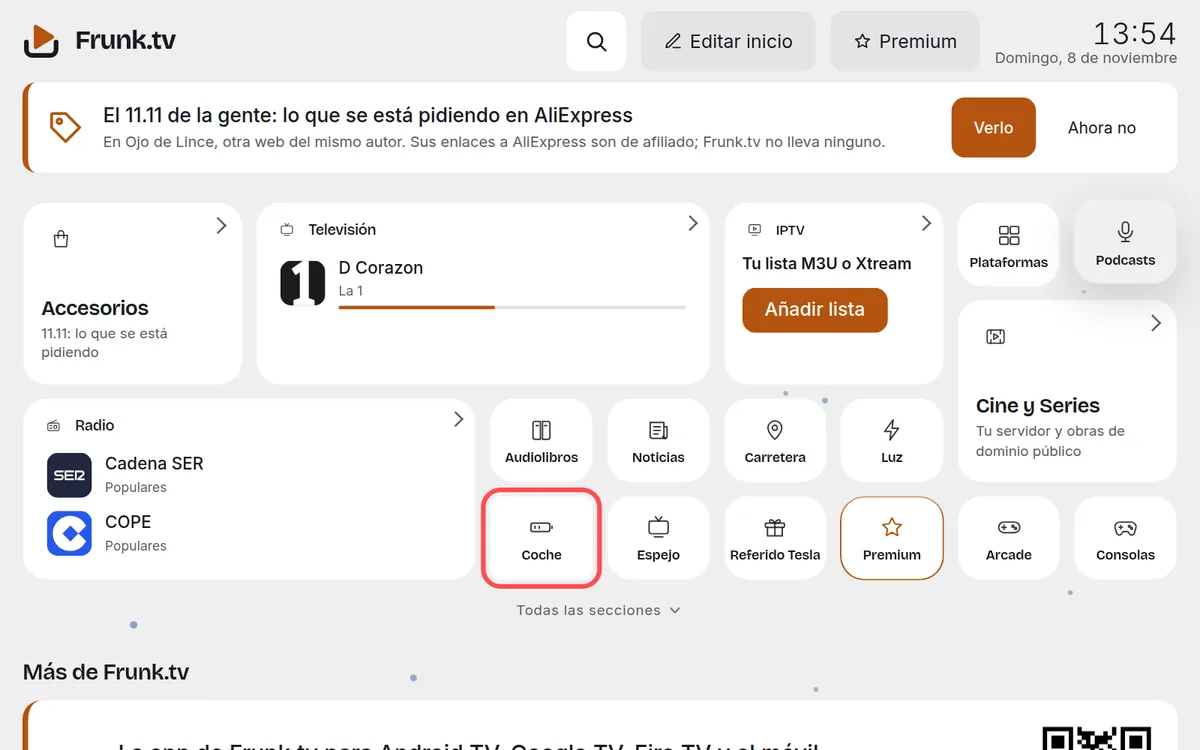
Like any card, it can be moved, enlarged or hidden. - Tap it: the status, the latest trips and charges, and the drives, large.
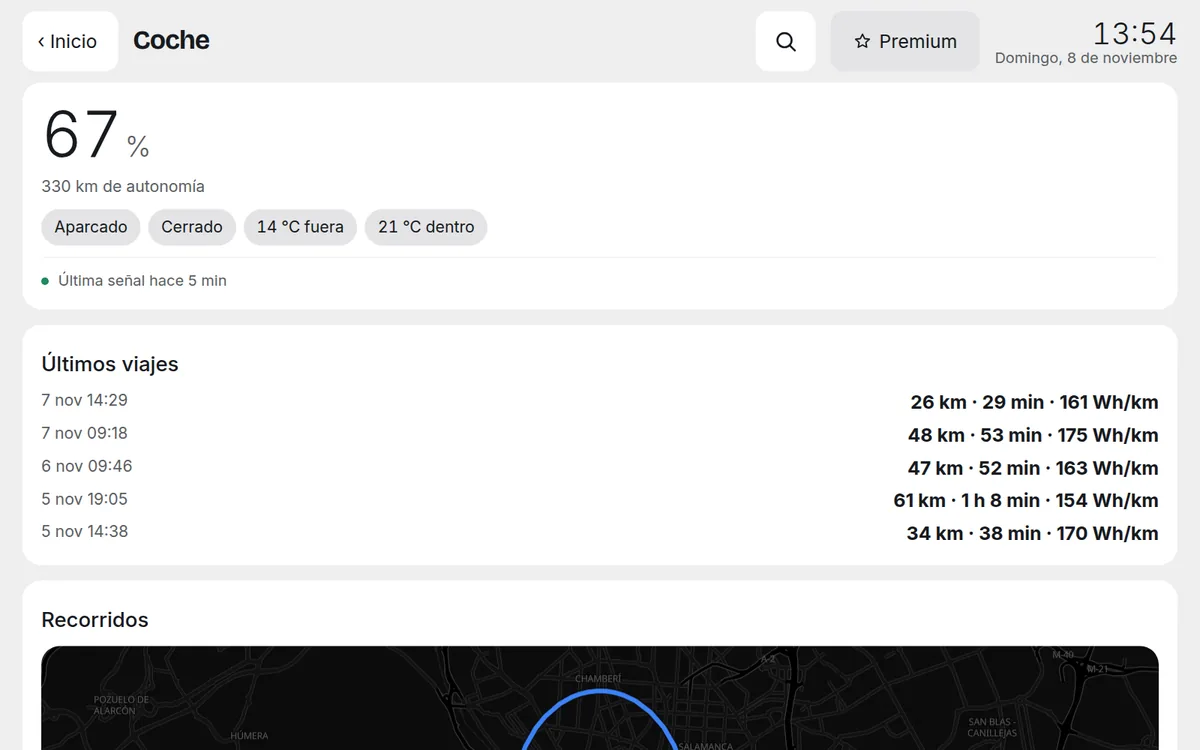
On the car's screen. 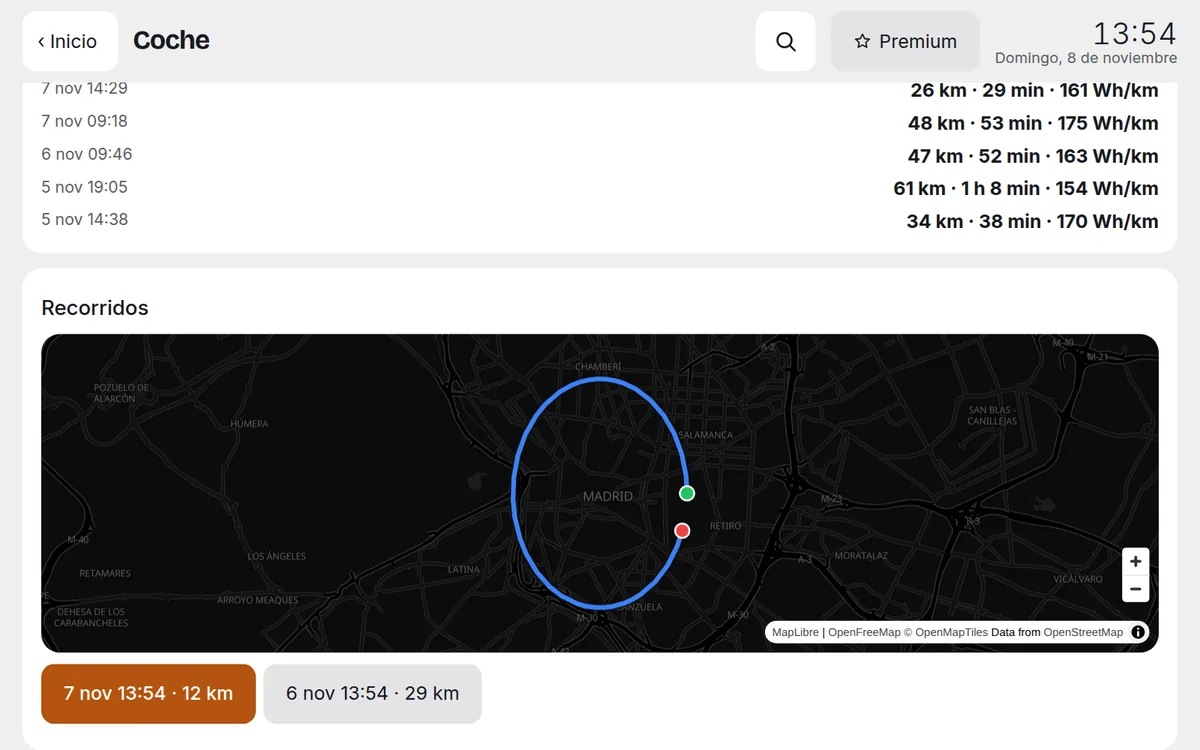
The drives, with the key that arrived by itself from your computer.
11. On the Home of your phone and your computer
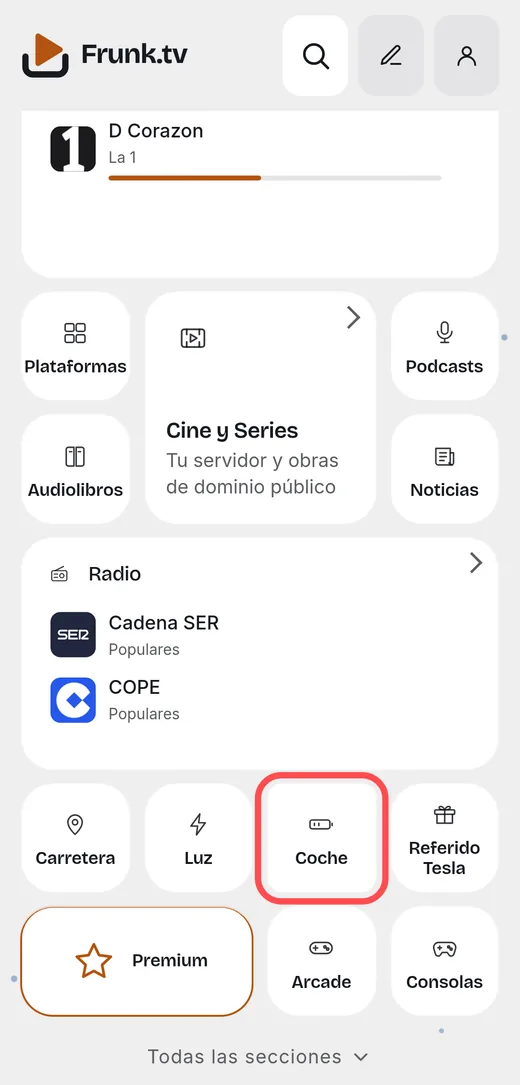
If you have signed in to frunk.tv/cuenta on that phone or computer, the Coche card also appears on its frunk.tv Home, with the car you picked on the page. It opens the same screen as in the car.
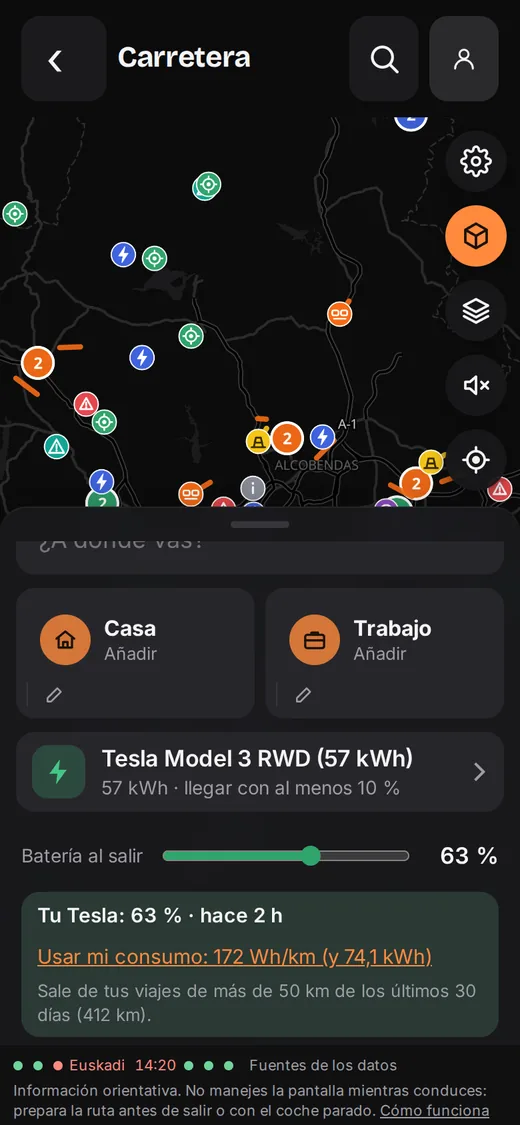
12. Carretera with your real battery
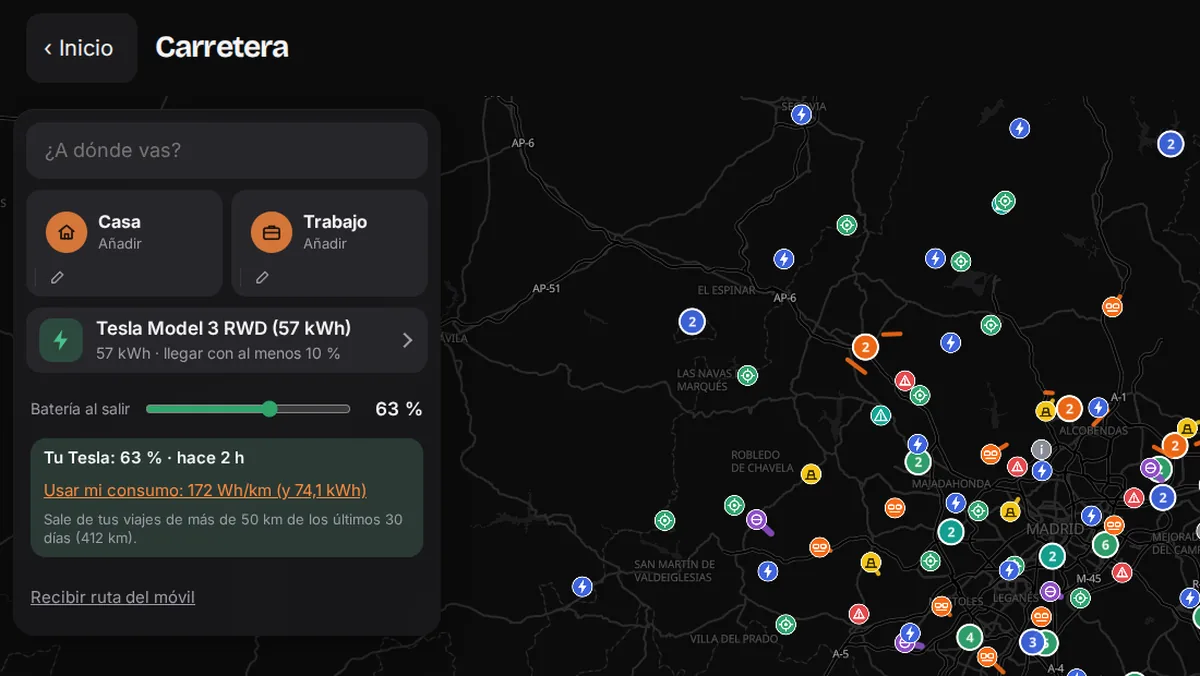
In Carretera, when planning an electric route, a card appears with your Tesla's battery and its time. If the data is less than a day old and the car is neither charging nor driving, it is set by itself in “Battery at departure”; if not, a button sets it.
With Use my consumption, the plan uses the real consumption of your long trips (50 km or more, in the last 30 days) and your battery's usable capacity, instead of those of an example car. It is never changed by itself.
13. Your subscription in the bot
/coche: until when you have it and whether it renews./coche cancel: it stops renewing; it continues until the end of what you paid for./coche resume: it renews again./coche withdraw: in the 14 days after paying, you get a full refund.
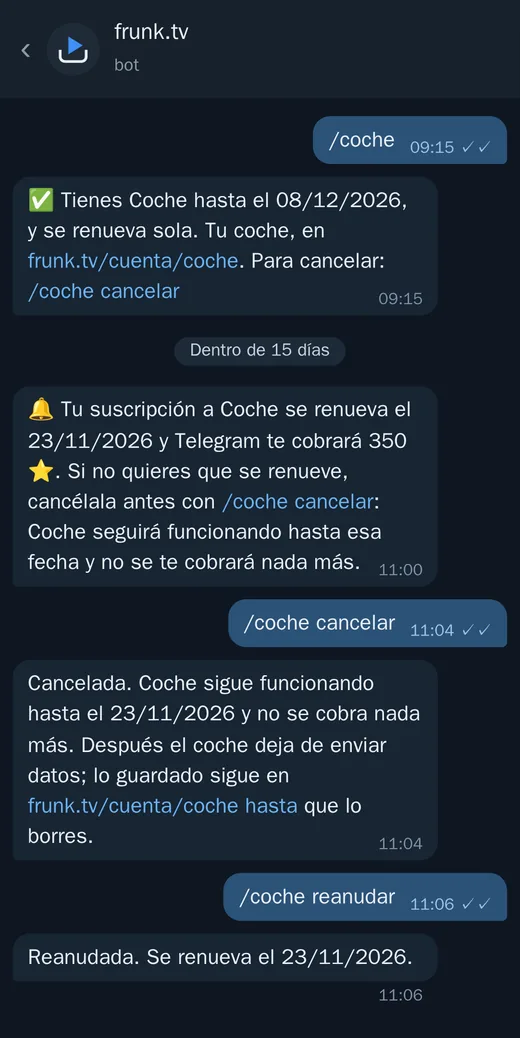
When the subscription ends, the car stops sending data and the bot tells you. What was stored stays at frunk.tv/cuenta/coche until you delete it.
14. Settings, removing the car and disconnecting
At the bottom of frunk.tv/cuenta/coche:
- See it on the screen of the car with the premium: in which car the Coche card appears, or in none.
- Car alerts in Telegram: turn the alerts on or off.
- The subscription line: until when and whether it renews.
- Remove this car: takes it out of Coche and deletes all its data from Frunk.tv (to set up another, or if you sell it).
- Disconnect from Tesla: withdraws the permission you gave Frunk.tv. It can also be withdrawn from the Tesla app.
If something doesn't work
| What happens | What to do |
|---|---|
| “Tesla's return arrived in another browser” | You started inside Telegram or in another app. Open frunk.tv/cuenta/coche in the regular browser on your phone and connect again. |
| It won't let me approve the key | Do it next to the car, with Bluetooth on and the Tesla app updated. If the app asks, hold the key card against the reader. |
| It has been “waiting for the first data” for a while | Open or drive the car: asleep it sends nothing. If a day goes by, write to [email protected]. |
| The last signal is hours old | The car is asleep or out of coverage. That is normal: Frunk.tv doesn't wake it up. |
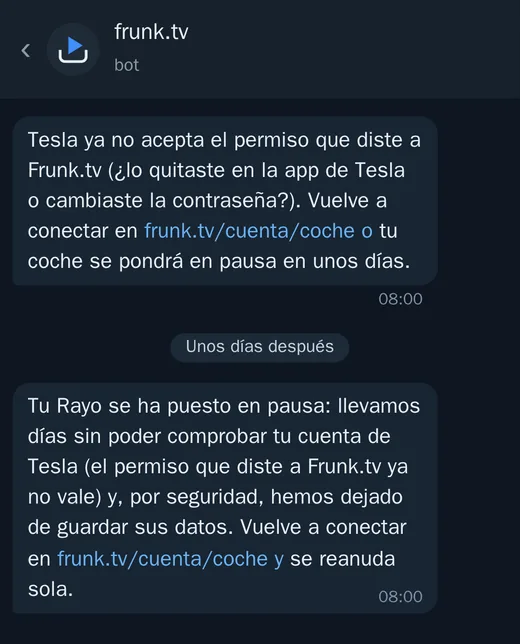
| The bot says Tesla no longer accepts the permission | You changed your Tesla password or removed the permission in its app. Connect again at frunk.tv/cuenta/coche; if not, within a few days the car is paused (and resumes by itself when you connect). |
| The map asks for a key | That screen doesn't have it. Paste it, or sync that device with your Premium and it arrives by itself. |
| The Coche card doesn't appear in the car | In the settings, pick the Premium activated in that car, and reload frunk.tv in the Tesla. |
Your privacy
- Read-only: Frunk.tv has no way of sending commands to the car.
- Your Tesla password doesn't pass through Frunk.tv; the permission Tesla grants is stored encrypted.
- The position is never stored in the clear: without drives, it is discarded; with them, it is encrypted with a key that only your screens have.
- The vehicle identification number (VIN) is not shown anywhere.
- The data is kept for a year, and deleted when you remove the car or your account. More in the privacy policy.
Frequently asked questions
- How much does Coche cost?
- It is exclusive to Premium (600 Stars, a one-time payment), and the connection to Tesla costs 350 Telegram Stars every 30 days per car. You can cancel whenever you like with /coche cancel, and in the 14 days after paying /coche withdraw gets you a full refund.
- Is it included in Premium?
- What is Frunk.tv's own is: the screens, the drive map, the alerts and your car in Carretera. The connection to Tesla is not, even with Premium bought by October 31, 2026: Tesla charges for every car and every month.
- Can Frunk.tv open or move my car?
- No. Coche only reads data: it doesn't unlock, start, turn on the climate or wake up the car. Frunk.tv doesn't see your Tesla password either, which you type on Tesla's page.
- Does it store where I drive?
- Only if you turn on the drives, and then encrypted with a key that only your screens have: not even Frunk.tv can see them. If you don't turn them on, the position is discarded without being stored.
- What alerts does the bot send?
- Charge finished or interrupted, a door or the trunk left open, the car unlocked, Sentry on alert or alarm and an update available, up to an hour late. You turn them off at frunk.tv/cuenta/coche.
- It won't let me approve the key, what do I do?
- Do it next to the car, with your phone's Bluetooth on and the Tesla app updated, and tap “Approve in the car” on your phone. If the app asks, hold the key card against the car's reader.