What you can do with the Tesla browser
The Tesla in-car browser opens almost any website, but it is not made for the car: small buttons, no way to pick files, not even a button to hide its bars. Frunk.tv bundles what the car doesn't do natively in one page with big touch targets. It is free, needs no account and there is nothing to install: type frunk.tv in the car's browser.
What it does
- Television Official free-to-air streams from your country (in 29 countries). With the car parked.
- Radio Your country's stations and music by genre. It keeps playing while you drive.
- Podcasts and audiobooks Your country's top podcasts and free classics, resumed where you left them.
- News Headlines by topic, the latest radio news bulletin or the headlines read aloud.
- Electricity The hourly power price in 17 European countries and the cheapest time to charge at home.
- Carretera Traffic, speed cameras, chargers and routes with stops for electric or combustion cars.
- IPTV Your own M3U or Xtream Codes list, sent from your phone with a QR code.
- My IPTV list won't load If your provider doesn't let the car read it, your phone downloads it and sends it.
- Games Eight games for the parked car, Halloween Trick or Treat included, and your own console games, with your phone as the controller.
- Buy and activate Premium Step by step, with screenshots: in the car with its QR code, or with no car on a computer.
- Full screen and theater mode Half screen while driving, full screen in Park and theater mode with no bars.
- Movies & Series Your Jellyfin, Emby or Plex, your NAS or a catalog, and your AllDebrid account, step by step.
- The Android app Frunk.tv on Android TV, Fire TV and phones: TV with the remote, radio in Android Auto and your IPTV.
How to start
- With the car online, open the browser from the touchscreen.
- Type frunk.tv in the address bar.
- Tap a tile on Home: Television, Radio, Podcasts… or use the magnifying glass at the top to search stations, channels, podcasts, audiobooks and news at once. With «Edit Home» the tiles can be resized, reordered or hidden, and given a wallpaper. At the foot of the tiles, «All sections» lists every one, by group and hidden ones too; the ones not on Home have «Add to Home».
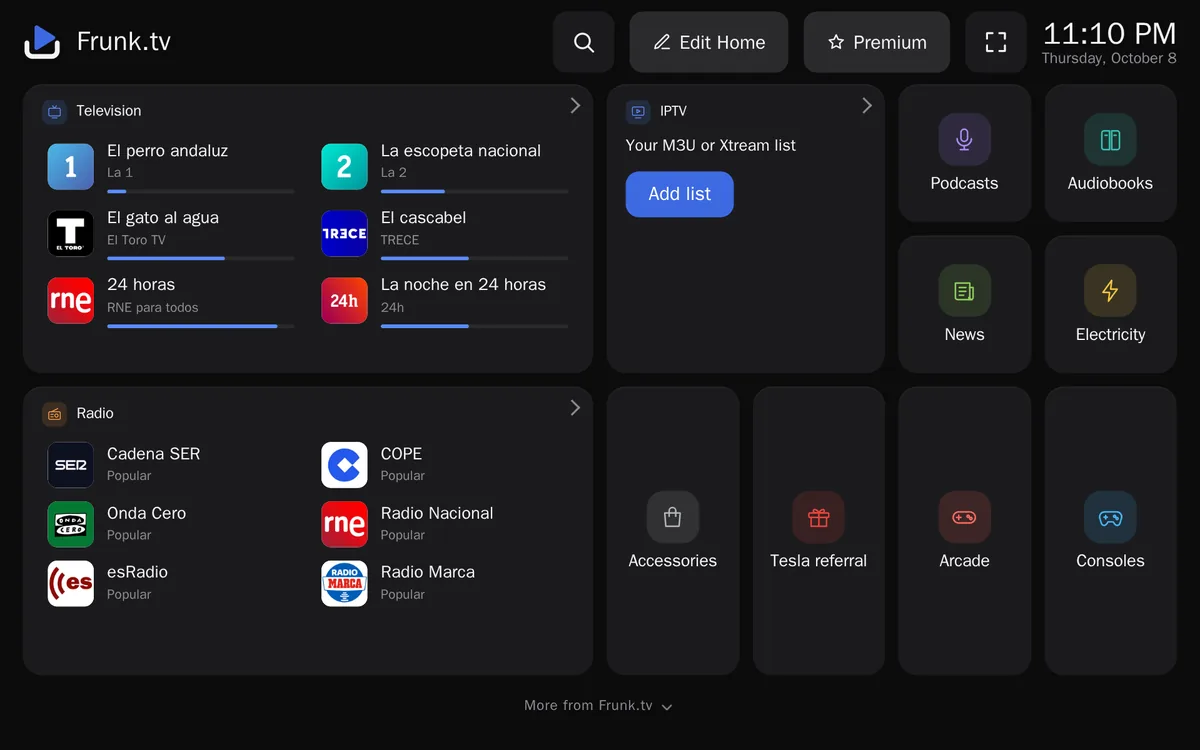
In your language, with your country's content
Frunk.tv shows itself in the car's language (English, Spanish, German, French, Dutch, Italian or Portuguese; any other language gets English) and picks TV, radio, podcasts, news and the power price by the car's country. Both can be changed in «Language and country», at the bottom of Home. It started in Spain, and Spain still has the most: about 240 TV channels with their programme guide and about 900 radio stations. In the UK, Ireland, the US and the rest of Europe you get your country's own stations, charts and newspapers; the guides below say what each section has where.
Missing channels?
If you have an IPTV list, Frunk.tv plays it too: tap Add list on the IPTV tile of Home (step by step, with screenshots).
It works in the half-screen browser while you drive, full screen in Park and in theater mode, with no bars at all. It works on a computer, a tablet or a phone too.
Privacy
No account and no sign-up. Favorites, IPTV lists and passwords are kept in the car's browser, not on the server, and video and audio go straight from each broadcaster to the car. Visits are counted anonymously and without cookies, never with which channel or station you play. The only account is premium's, optional and paid: you sign in with Telegram, and it keeps an end-to-end encrypted copy the server cannot read. Frunk.tv's Help says what is kept where.
Questions? See the frequently asked questions.
Frequently asked questions
- Is Frunk.tv free?
- Yes. No account is needed and there is nothing to install: type frunk.tv in the car's browser. There is also an optional premium, paid once per car, with a Telegram account and an encrypted automatic backup.
- Does Frunk.tv work outside Spain?
- Yes. It shows itself in the car's language and picks TV, radio, podcasts, news and the power price by the car's country, with official free TV streams in 28 countries besides Spain.
- Is Frunk.tv related to Tesla?
- No. It is an independent project with no relation to Tesla, Inc.