Carretera: traffic, speed cameras, chargers and routes for the Tesla
A full-screen map with what is happening on the road right now and a trip planner for electric or combustion cars. Carretera, in Frunk.tv, brings together traffic incidents, speed cameras, chargers, petrol stations and mountain passes, searches for routes with alternatives and guides you by voice while you drive. It is free, requires no account and works on phones and computers too, also in the Android app. It covers Spain.
What the map shows
Open Carretera from Home. The Layers button, at the top right, turns each layer on or off, and Frunk.tv remembers which ones you left on.
- Traffic incidents: accidents, road closures, traffic jams, roadworks and other hazards, with the road, kilometer marker, direction and time. They update every few minutes.
- Speed cameras: fixed and section speed cameras, so you know where they are.
- Chargers: charging points across Spain, with their operator, power and connectors.
- Petrol stations: with the official prices of each fuel.
- Mountain passes: with snow and ice forecasts and warnings when snow chains are needed.
Tap any marker to open its details. When zooming out, markers cluster so the map does not get cluttered.
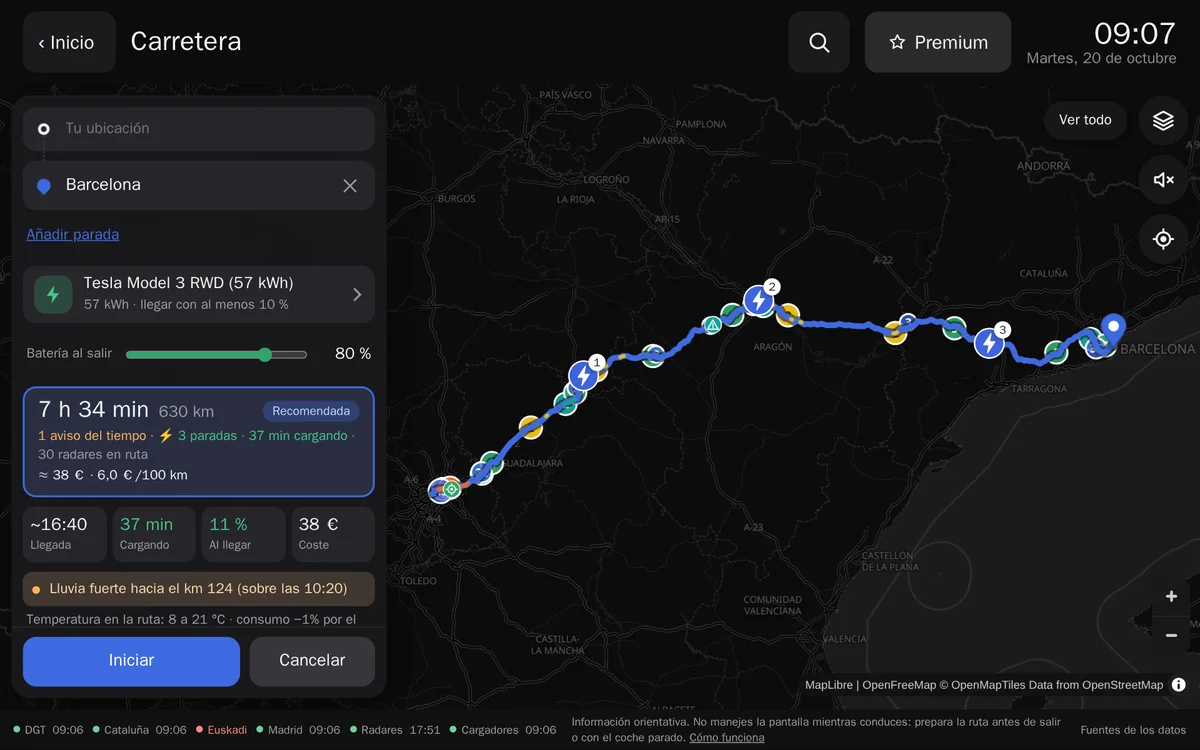
Searching for a route
Type a destination in the search box and choose one of the suggestions. The starting point is Your location, or the point you choose in its field, and with Add stop you can pass through up to five places before arriving. Carretera suggests a recommended route and one or two alternatives, each with its duration, distance, warnings (whether it passes through a road closure, how many speed cameras there are, what the weather will be like) and, if needed, stops. Tap a card to switch routes; if the best one passes through a closure, Carretera finds another that avoids it. To avoid tolls, turn on Avoid tolls in Your car → Route options.
With a route on screen, the map keeps only what matters to you: incidents, speed cameras, petrol stations and chargers that are on your way. The Show all button returns to the full map.
Travelling in an electric car
Under Your car, below the search box, select Electric, choose your car (or enter the battery and consumption by hand), how much battery you want to arrive with and how much you charge up to; what battery you leave with is changed without leaving the plan. Frunk.tv calculates:
- Where to stop to charge, with charger power, battery on arrival and departure, and how long each stop takes. You can set a minimum power or Tesla Superchargers only.
- The effect of weather on consumption: cold, heat, rain and wind change what the car uses.
- Rest stops every 2 hours, as recommended by the DGT, so the trip includes sensible breaks. They are enabled by default; turn them off with «Rest breaks every 2 h».
- The trip cost: what you pay at chargers along the route and what charging at home costs during the cheapest PVPC hours (see Electricity price), for comparison.
- If no plan is possible, it tells you why, for example “no 50 kW chargers for 180 km”.
Travelling in a combustion car
With a petrol or diesel car (Combustion in Your car), the planner adds refuelling stops based on your tank and consumption, with petrol stations along the route and their official prices. It also compares what the trip costs with fuel.
Start: follow the route with voice
With Start, Carretera tracks your position along the route. It does not provide turn-by-turn directions: it is a line to stick to. It tells you remaining time and distance, arrival time, the next alert and the upcoming stop. By voice, it warns of a speed camera 500 meters ahead, a traffic jam or closure further on, a weather change and an approaching charging stop. Voice alerts can be turned off with the speaker button. With no destination, if voice and your location are on, it also warns of fixed speed cameras ahead in your direction of travel. If you go off route, Recalculate appears. The screen stays awake while you follow the route (if your browser allows it).
From phone to car
Plan the trip at your leisure on your phone and send the plan to the car: the route, with its stops, appears on the Tesla's map. It is end-to-end encrypted.
- In the car, open Carretera and tap Receive route from phone: a QR code appears.
- Scan it with your phone, plan the route and tap Send to car.
Without a code, Send to car copies a link with the plan to open it in the car.
With premium
Everything above is free. With premium, in addition:
- My places: Home, Work and the destinations you save with «Save to», one tap from the search box.
- Recent: your latest destinations.
- Your car, layers, My places and Recent, synced with the car and your other devices, end-to-end encrypted.
- Send to your screens: the plan reaches the car without scanning any code.
Where the data comes from
Frunk.tv makes nothing up: it brings together open data from public bodies and free projects. It adapts it (filters, merges and translates it, without changing its meaning), and the map footer shows when each source was last updated. None of these bodies or projects takes part in, sponsors or endorses Frunk.tv.
- Traffic incidents: Spain's Directorate-General of Traffic, through the National Access Point (NAP), under the Creative Commons Attribution licence (CC BY). Source: DGT. In Catalonia, Generalitat de Catalunya. Servei Català de Trànsit; in the Basque Country, the Basque Government Traffic Directorate, through Open Data Euskadi; and in the city of Madrid, Madrid City Council (datos.madrid.es, CC BY 4.0).
- Chargers: Ministry for the Ecological Transition and the Demographic Challenge (MITECO), through the NAP (CC BY).
- Fuel prices: MITECO, the prices each station reports, with the date and time the Ministry gives.
- Weather: data from MET Norway, the Norwegian Meteorological Institute (NLOD 2.0 / CC BY 4.0).
- Speed cameras, mountain passes, place search and routes: © OpenStreetMap contributors, under the ODbL licence. Routes are calculated with Valhalla and search is Photon, on Frunk.tv's servers.
- Map: OpenFreeMap © OpenMapTiles, data from OpenStreetMap, drawn with MapLibre GL JS.
The full terms are in the legal notice.
For guidance only
- Incidents are those published by traffic authorities, and may arrive late or be missing.
- It is not known whether chargers are free or busy, or whether they are working right now.
- Prices are not an offer. Fuel prices are those each station reports to the Ministry, with their date, and the pump price prevails. Charging prices are approximate, from each network's list price reviewed on the date shown, and the price the operator shows when you charge prevails; you can enter your own.
- Weather, consumption, charging time and cost forecasts are estimates.
Your privacy
To search for a place or calculate a route, what you type, the destination, the stops and the starting point go through our own servers. If you start from your position, the browser asks for permission and that position goes to the server to calculate the route; with Start it stays on your device, except when you tap Recalculate. The server does not store or log origins, destinations or coordinates: it keeps them in memory for a few minutes so as not to repeat the same query. For the weather, it sends MET Norway route points rounded to about 11 km, with nothing that identifies you. Map tiles are served by OpenFreeMap directly to your browser. Your car, your settings and the layers you have on are stored in your browser; with premium, they sync end-to-end encrypted with your other devices. The plan you send to the car is end-to-end encrypted and kept in the server's memory for a few minutes, only for the car to pick it up. More in the privacy policy.
About speed cameras
In Spain it is legal to warn where speed cameras are, as Waze or Google Maps do: the Traffic Act bans radar jammers and detectors but expressly excludes «warning devices that report the position of traffic enforcement systems» (art. 13.6). Carretera detects nothing: it only shows the known position of fixed and section speed cameras, from OpenStreetMap, and does not show mobile speed cameras, because they cannot be known.
Frequently asked questions
- Where does Carretera get its data from?
- From the DGT (NAP, CC BY licence), the Generalitat de Catalunya (Servei Català de Trànsit), the Basque Government Traffic Directorate and Madrid City Council for incidents; from MITECO for chargers and fuel prices; from MET Norway (NLOD 2.0 / CC BY 4.0) for weather; and from OpenStreetMap (ODbL) for speed cameras, mountain passes, routes and the map, with OpenFreeMap tiles. None of them sponsors or endorses Frunk.tv.
- Does Carretera show mobile speed cameras?
- No. Only the known position of fixed and section speed cameras. In Spain it is legal to warn where they are (art. 13.6 of the Traffic Act); radar detectors and jammers are prohibited, and Carretera detects nothing.
- Does Frunk.tv save my destinations?
- No. Searches and routes, with your position if you start from it, go through Frunk.tv's servers, which do not store or log origins, destinations or coordinates: they only keep them in memory for a few minutes. While following a route your position stays on your device unless you tap Recalculate.